Showing posts with label Internet. Show all posts

Jan 25, 2011

THE VERDICT: 1Malaysia, 1SocialNetwork

Introducing Malaysia's new social network.
1Malaysia.com

Yup. That's right. 1Malaysia.com, very close to our Prime Minister's 1Malaysia.com.my.

I signed up after I saw Jason Goh's (@smashpOp) twitter post.

smashpop's tweet
How was 1Malaysia.com?
The VERDICT:
1: Signing up was pretty easy. I got it all up in 3 minutes. There is no verification mail though, so I guess someone else can set up an account in your email and name without your consent.

2: My first impression on 1Malaysia.com was it looks like Apple's website. 
3:They have the "Like" and Comment button. You can share links, video, photo and also Music. You will have your own wall and a public wall (that's what i call it). The homepage will be the public wall, where you can share links, video, photo and also Music and the whole community can see it. 

4: How is it different from Facebook? There is this music sharing function where you can upload your music/songs and share it with the whole community. You will be able to add your favorite uploads to your own playlist. 
Besides, you can share videos, photos and even create groups in the 1Malaysia community.
There is also a forum but it doesn't allow you to delete your post after you've created one   :(
5: Lastly, any privacy concerns? They allow you to tweet the privacy settings, but not as advanced as Facebook's though.  

Conclusion: Should you join? Well, it's still a very new site with 12,357 members (as at 25/1/2011 12.37AM GMT+8). I don't see a point quitting Facebook for this yet because there's no applications and I did not see any photo tagging function also.

The Star's mStar has reported about it on the 17th of January 2011 in this article 1malaysia.com sedia ganti Facebook, though i don't think it will replace Facebook until they release the codes for application developers.

Posted at 12:42AM, 25/1/2011 and there's 12,362 members already, an addition of 5 members in 5 minutes!

Jan 22, 2011

Imgur, share your images easily.

Imgur, the simple image sharer
Introducing Imgur.com. Imgur (pronounced as image-er; imager.) allows you to share images online without having to open an account. As long as your image file is less than 10MB, you can upload it to Imgur and share it with your friends. You may ask how long will the image be on Imgur. On it's FAQ page, it says that as long as your images are getting at least 1 view every 3 months, they will stick around forever. After that, your image may be removed to create more space for newer images. Besides, your pictures will be anonymous, which means that no one knows who posted what and private images will not be made public.


If your pictures gained a certain popularity, it will be added to the Gallery and you can look for the trending ones on Topsy- a real time search engine for Twitter.


Can the images be deleted after you upload it? Yes. There will be a "Deletion Link" at the bottom left after you uploaded the picture (Refer to the picture below). Remember, the deletion link only shows up once, so make sure you save a copy of it just in case you want to delete it in the future. 


Imgur, the simple image sharer, screenshots after upload


Format of Image allowed: JPEG, GIF, PNG, APNG, TIFF, BMP, PDF, XCF (GIMP). Please note that the TIFF, BMP, PDF and XCF formats will be converted to PNG on upload.


Size: A maximum of 10MB and those over 1MB will automatically be compressed or resized to 1MB, for better viewing.

Nov 22, 2010

Google's Guide to the Internet

20 Things I Learned About Browsers and the Web

Google published a simple, illustrated, short guide on web browsing and the internet on 20 Things I Learned About Browsers and the Web. It is very easy to understand as Google guides and tells about the basics of the internet (TCP/IP), cloud computing, IP addreses, HTML5 and security risks and threats in the online world. Check this guide out as it is loads very fast and is easy to understand.


Find out why plug-ins are pepperoni for your cheese pizza.

You can resume reading even after you close your browser (as long as you preserve the cookies).

You can print the books or download as PDF by clicking the "PRINT BOOK" button. You can also read with a white or dark background by toggling the scroll bar between the bulbs.


Oct 16, 2010

New Skype 5.0

Try the new Skype 5.0 now!

There's a new interface now and it is now integrated with Facebook so you can check the latest status updates and call all in one program!


Previously on techknew:


Jul 1, 2010

TechKNEW has a new layout & Google News has been updated

*Techknew has a new layout!*

After a half month hiatus and semester break, finally, Techknew is updated. I'll recommended videos on KnewTube.blogspot.com and weird or unknown facts on KnewFacts.blogspot.com. Do check them out ya~!

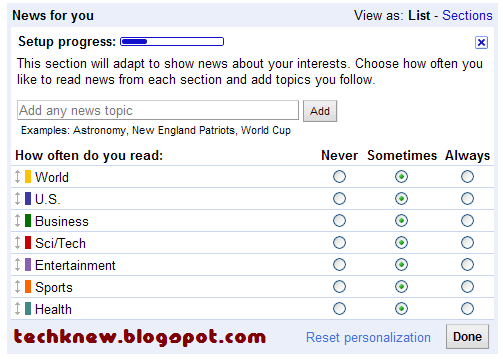
For a restart, Google News is on the news today as it has been updated to allow each user to have a personalized news page according to one's interest.


The Google News' home page is slightly tweaked with the trending top stories listed on the left side bar whereas the News Edition settings has been switched to the right (as shown below). 


There is a new "Add a section"(as shown below) beside the News Editions settings which allows you to add different news categories such as Social Networking NewsMobile Technology News and more. 


Lastly, another notable update is this "News for you" in the middle of the Google News home. This allows you to customize how often you would like to read news from each section and add topics you follow.


Apr 12, 2010

New Google Labs Feature in Gmail - Message Sneak Peak


Read more aCnet.

Jan 20, 2010

What Browser?

Check out

What Browser.com 

which is made by

Jan 12, 2010

Convert PDF documents to WORD* format without hassle

* WORD documents such as Rich Text Format (.RTF), Microsoft Word, OpenOffice, and WordPerfect.


Convert PDF to Word files easily with NitroPDF's PDF to Word


You can either convert your files online or download the 14-Day trial.


Details
Publisher : Nitro PDF 


Operating systems: Windows Vista, Windows Me, Windows NT, Windows XP, Windows 2000, Windows 98


License model : Free online usage (or 14 days trial)


Download from : PDF to Word Home Page

Jan 7, 2010

*Buntu? Not anymore.

*Buntu means blocked or lost in Bahasa Malaysia.


Lost in Ubuntu? Cannot connect to the internet in Ubuntu? Too many command lines to remember?


With the Ubuntu Pocket Guide and Reference, you can now have a reliable source for all the help you needed long ago. From installing Ubuntu to managing and securing the system.


It's FREE!!

The book walks the user through installing Ubuntu, so all that's needed is a computer. Installing using Windows is covered, however.


Get it now from CNET or straight from the Ubuntu Pocket Guide and Reference's Homepage!


Details
Publisher : Ubuntu Pocket Guide and Reference


Operating systems: Windows 2003, Windows Vista, Windows Me, Windows NT, Windows XP, Windows 2000, Windows 98


Release date : January 19, 2009


File size : 1.97MB


License : Free


Download from : CNet - Download.com
                                
                                         or


   Ubuntu Pocket Guide and Reference's Homepage

Nov 22, 2009

[SOLVED] Google Chrome - Aw, Snap! He's Dead, Jim!

If you are using Google Chrome web browser and "Aw, Snap" or "He's Dead, Jim!" happens no matter which website you go, please follow the instructions below.


Steps:
1) Uninstall Chrome
2) Open Windows Explorer
3) If you do not have Show Hidden Files enabled, then in Windows Explorer hit Tools - Folder Options - View -Select 'Show Hidden Files and Folders - OK.
4) Navigate to C:\Documents and Settings\[the user you're using]\Local Settings\Application Data\Google
5) Delete the Chrome folder.  (some process had this folder locked for me, so I had to navigate into each subdirectory within the folder and delete all files manually)
6) Reboot
7) Install Chrome


Nov 20, 2009

Have a glimpse of Google Chrome OS

Here are some pictures of the new Google Chrome OS from CNET and TechCrunch.


Chrome OS applications

Chrome OS full screen

chromeoshome-1

chromeos2

8ca6d771

chrome20091013

compactnavbar2

Chrome OS panels

Chrome OS contacts

Chrome OS vision

chromeoshome


Related Articles


Nov 18, 2009

New Google Homepage


Check out the new Google Homepage which has shrunk from 30+ words to just 5 words in one page.  Google's famous "I'm Feeling Lucky" button famously went missing too. Try moving the mouse to reveal more of the page.


Details
Check it out at Google.com

Google Chrome OS set to be launched on Thursday


chrome-logo
"Google is planning to hold a special Chrome OS event at its headquarters in Mountain View, CA this Thursday morning, we’ve just been notified. The plan is to give some technical background information as well as show off some demos, we’re told. More notably, they will be giving a “complete overview” of the new OS, which they say will launch next year....."


..continue reading at TechCrunch

Google Set to Dash

Google Dashboard is here to allow you to have an overview of all your Google accounts. Here, you can change your profile and account settings for Google applications such as Blogger, Gmail, Youtube and many more.

Check it out at Google.com/Dashboard