Showing posts with label Search engine. Show all posts

Feb 25, 2011

Let's cook with Google!! Google recipes more easily on Google now!


Google search is now enhanced with "Recipes" view, which makes the task of finding recipes in the internet easier. You also get to customise the ingredients search through the radio buttons on the sidebar.

Try it now at Google Search here (currently available on Google US only - 6th of March 2011).

Tags: How to Google recipes

Nov 11, 2010

Google Search: Google Instant Preview

Now you can have a sneak preview of your search results on Google with its new Google Instant Preview. 
1. Enable it HERE.
2. Do a search on Google and click on the magnifying glass beside the search results. You'll see the preview on the right.

Nov 1, 2010

Will Blekko "slash" Google and Microsoft's Bing?

blekko logo is the new search engine which uses what they call the "slashtags".

This will narrow down searches as the users create and refine searches to filter out spam searches.

This allows you to create some sort of categories like the "hashtags" in Twitter.

To try out log on to http://blekko.com/.

Click on some of the current popular searches on Blekko (as at 2.40pm, 1/11/2010):


(Credits: PCMag.com)

Previously on techknew:

Google Search Tips

Sep 9, 2010

Google Search: Google Instant

Check out the new Google Instant!
Results are shown as you type.
Only on Google.com (US).
If you are directed to your country's Google,
click "Go To Google.com" on the bottom left of the homepage.


Aug 1, 2010

Google Chrome Extensions - Wikipedia Companion - Mini Wiki Browser and Google Dictionary (by Google)

Remember my post two days ago on Google Search Tips? 

Now, with Google Chrome, you can search things on Wikipedia and find definitions on Google Dictionary more easily with Wikipedia Companion - Mini Wiki Browser and Google Dictionary (by Google).

Click: 
Click: 

Not using Google Chrome yet? Download it from Google.

 
Google Dictionary (by Google) is easy to use as you can search the meaning of words by double clicking on the word.


It appears beside the address bar.


Not using Google Chrome yet? Download it from Google.

Jul 29, 2010

Google Search Tips

Today, I am going to share something that I love on Google Search. Here's some tips on using it.

1. To search the definition of a word, type "define: (the word that you want to search)" (without the inverted commas and brackets).

2. To find something within a website. Type "(things that you want to search) site: facebook.com" (without the inverted commas and brackets).


3. To maintain a phrase or to make a word compulsory during a search.

4. To convert measurements. 

5.  To convert currency.

6. Time. Type "time" then the name of city.

7. Weather. Type ""weather" then the name of city.

8. Calculations.


Jul 1, 2010

TechKNEW has a new layout & Google News has been updated

*Techknew has a new layout!*

After a half month hiatus and semester break, finally, Techknew is updated. I'll recommended videos on KnewTube.blogspot.com and weird or unknown facts on KnewFacts.blogspot.com. Do check them out ya~!

For a restart, Google News is on the news today as it has been updated to allow each user to have a personalized news page according to one's interest.


The Google News' home page is slightly tweaked with the trending top stories listed on the left side bar whereas the News Edition settings has been switched to the right (as shown below). 


There is a new "Add a section"(as shown below) beside the News Editions settings which allows you to add different news categories such as Social Networking News, Mobile Technology News and more. 


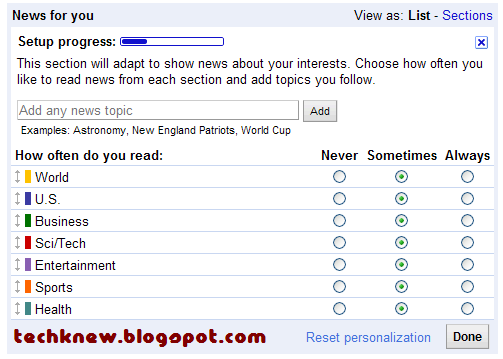
Lastly, another notable update is this "News for you" in the middle of the Google News home. This allows you to customize how often you would like to read news from each section and add topics you follow.


Jun 3, 2010

Google's Bing-like Homepage


Google allows you to customise the Google homepage with background photos now. Cool. It's like Bing now.

Just find the "Change background image" on the bottom left corner of the Google homepage. Try it now.

May 25, 2010

Pacman is on Google Homepage PERMANENTLY

Remember this? Do you miss this?

Google commemorated Pacman's 30th anniversary last week by putting Pacman on its homepage. Due to overwhelming demand, we can play it for free everyday because Google has made it permanently available now. Play it now at google.com/pacman.


May 23, 2010

Secure Google Search


If you want a more secure search experience on the internet, Google can help you by encrypting your search terms to stop any third party from intercepting your search results. All you need to do is to use https://www.google.com instead of the usual http://www.google.com.

A few notes about this beta version (Google Blog):
1. Searching over SSL doesn’t reduce the data sent to Google — it only hides that data from third parties who seek it.

2. It currently covers only the core Google web search product - Maps, Images Search, Shopping Search, etc do not support SSL at this time.

3. Since SSL connections require additional time to set up the encryption between your browser and the remote web server, your experience with search over SSL might be slightly slower than your regular Google search experience. However, you will still get the same results as I have tested (even the ads are the same). (Try searching the term "house" at http://www.google.com and https://www.google.com)
 
The results for the term "house" as seen at https://www.google.com

The results for the term "house" as seen at http://www.google.com

The results are the same.


May 21, 2010

Pacman on Google Homepage - TODAY only

Google homepage is now Pacman!! Try it Now! Click Insert Coin to start the game.

May 16, 2010

Google Mosaic

This is cool. Look at how Google built this using 884 pieces of photos.


(Source: Google Blog)


May 7, 2010

Google Search Sports New Look and Google Squared Labs

Google finally sports a new look on its search engine with Universal Search, the Search Options panel and Google Squared on its left panel. Universal Search helps you find the most relevant results for your search. The “Everything” option remains our essential search experience with different types of results integrated into the main results, but now you can also easily switch to just the particular type of results you are looking for (Google blog).


Google's new layout with a panel on the left.

The search bar is still the same.

The Goooooooooogle.


The left panel. It allows you to customise your search with a drop-down bar.

The left panel. It allows you to customise your search with a drop-down bar.


There are two new catchy stuff which can be found on the left panel.They are the Timeline and Wonderwheel. The Timeline can easily allow you to search within certain time frames using a timeline.


The Wonderwheel gives you related searches in a cool way. You might want to check it out. 


You can also try out Google Squared Labs, which is Google's search. It allows you to compare different entities in one search. You can try it out with searching "Digital cameras".


Jan 8, 2010

Google Chrome Extensions - Wikipedia Companion - Mini Wiki Browser and Google Dictionary (by Google)

Remember my post two days ago on Google Search Tips? 

Now, with Google Chrome, you can search things on Wikipedia and find definitions on Google Dictionary more easily with Wikipedia Companion - Mini Wiki Browser and Google Dictionary (by Google).

Click: 
Click: 

Not using Google Chrome yet? Download it from Google.

 
Google Dictionary (by Google) is easy to use as you can search the meaning of words by double clicking on the word.


It appears beside the address bar.


Not using Google Chrome yet? Download it from Google.