 Twitter
 Facebook
 Follow us on Google Reader
 Channel
 Home
Home Free
Free Feedburner
Showing posts with label Beta. Show all posts
Showing posts with label Beta. Show all posts
Feb 25, 2011

Jan 25, 2011
Review: Rockmelt-The social browser
Do you know that you can subscribe techknew through email? Click the "Subscribe" button. Techknew has an online store too - Techknew Online Store.

Launched at the end of last year, Rockmelt.com was one of the top tweeted trends on December 13, 2010. It is the new social media web browser, built based on Chromium (Google's open-source project). Naturally, it has the usual Google Chrome look.

Basically, it allows you to browse the web without having to open a new tab specifically for Facebook or Twitter. It also allows you to get feeds from sites by entering the site's URL or manually approving it when you browse a website. These feeds will appear on the right side of the browser(called App Edge).


On the left side of the browser (Friend edge), you will see your friends who are currently online.
You can easily share stuff online by click the share button just right beside the address bar too!
And, whenever there's updates or new feeds, there will be pop-ups on your taskbar (just like Windows Live Messenger's pop-ups) and it can be disabled at the "Options" tab. If you use Google Chrome on a normal basis, there is not much different from it.
Just logon to Rockmelt.com and click "Connect with Facebook" and "Authorise it" for their beta invite. Within 48 hours, come back to Rockmelt.com and the "Download" button will be there. Just download and install it.

After installation, just sign in into your Facebook account (sign in your Twitter account later) and allow for all the request for permission.


Remember to close Google Chrome if you want to import your Chrome settings into Rockmelt.

Enjoy your new browsing experience with Rockmelt! If you need some guide around Rockmelt, type in "rockmelt://help/" (without the inverted commas) within the Rockmelt browser.
(Some facts are taken from Wikipedia)
Do you know that you can subscribe techknew through email? Click the "Subscribe" button. Techknew has an online store too - Techknew Online Store.
Nov 1, 2010
Will Blekko "slash" Google and Microsoft's Bing?
 is the new search engine which uses what they call the "slashtags".
This will narrow down searches as the users create and refine searches to filter out spam searches.
This allows you to create some sort of categories like the "hashtags" in Twitter.
To try out log on to http://blekko.com/.
Click on some of the current popular searches on Blekko (as at 2.40pm, 1/11/2010):
(Credits: PCMag.com)
Jul 25, 2010
Windows Live Essentials Beta 2010 comes with NEW Windows Live Messenger
Windows Live Essentials Beta now comes with the new Windows Live Messenger for Windows 7! Chat in HD! And Outlook is now integrated with Facebook! Available for Windows 7 and Vista only. The status button on the Aero Peek on your task bar is so cool!

It has a new sign in interface and allows you to integrate your messenger with Facebook and Myspace. What's more? The interface is very Facebook-like. And you can toggle between the old and new Messenger. You can comment on your friend's status on the new Live Messenger.

Multiple chats now appear in TABS form, like in ebuddy!!! No more complains on "where is that window? where is it on the taskbar?"' YAY!
This comes with a free Windows Live Photo Gallery Beta which allows you to edit and post photos up on Facebook and videos on Youtube easily. Windows Live Movie Maker Beta is also part of Windows Live Essentials.
Try it NOW!
Download it from Windows Live Essentials Beta.

It has a new sign in interface and allows you to integrate your messenger with Facebook and Myspace. What's more? The interface is very Facebook-like. And you can toggle between the old and new Messenger. You can comment on your friend's status on the new Live Messenger.

This comes with a free Windows Live Photo Gallery Beta which allows you to edit and post photos up on Facebook and videos on Youtube easily. Windows Live Movie Maker Beta is also part of Windows Live Essentials.
Try it NOW!
Download it from Windows Live Essentials Beta.
May 23, 2010
Secure Google Search

If you want a more secure search experience on the internet, Google can help you by encrypting your search terms to stop any third party from intercepting your search results. All you need to do is to use https://www.google.com instead of the usual http://www.google.com.
A few notes about this beta version (Google Blog):
1. Searching over SSL doesn’t reduce the data sent to Google — it only hides that data from third parties who seek it.
2. It currently covers only the core Google web search product - Maps, Images Search, Shopping Search, etc do not support SSL at this time.
3. Since SSL connections require additional time to set up the encryption between your browser and the remote web server, your experience with search over SSL might be slightly slower than your regular Google search experience. However, you will still get the same results as I have tested (even the ads are the same). (Try searching the term "house" at http://www.google.com and https://www.google.com)

The results for the term "house" as seen at https://www.google.com

The results are the same.

The results for the term "house" as seen at http://www.google.com
May 21, 2010
Google Wave Opens to Everyone

Remember Google Wave? These were the few posts from last year:
It's a tsunami.. It's a typhoon.. It's Google Wave...
The wave is on the way.. Prepare yourself...
Yesterday, Google has decided to open it to everyone. Now you can sign up for it at Google Wave Labs.
Google Font Directory

Hey! Check out Google Font Directory. It allows you to browse and use fonts on your website for free. All you have to do is choose the font that you desire and get the HTML codes to embed it on your webpage/blog. However, it is still in beta and not many fonts are available yet. Still, you can check it out.
May 20, 2010
Google Fast Flip


You can just flip through more than ten headlines at once, and getting some interesting ones on the way. Like this one below.


Source: Popular Science - A Brief, Buttery Ride on Shanghai's Maglev Train
Something that you should know when you're sitting in a bullet train. Mass murder of birds or any animals which happen to be at the railway do occur, when the bullet train approaches them. May be that's why it is called a Bullet train.
Apr 12, 2010

Jan 26, 2010
Convert Docx to Doc
Are you using Microsoft Office 2003 and someone sends you a .Docx file?
Now you can still access it for editing and reading by converting it to .Doc.
by downloading the DOCX CONVERTER widget on your desktop

or
by downloading the Microsoft Office Compatibility Pack for Word, Excel, and PowerPoint File Formats for Microsoft Office XP and 2003 users.
Jan 21, 2010
Find > Mix > Watch - Only on Youtube FM
Launched at TestTube at Youtube, it allows you to

You can make playlists and discover new artists and music videos.
With this, you can also add and delete songs or videos easily.
Try NOW.
You can make playlists and discover new artists and music videos.
With this, you can also add and delete songs or videos easily.
Try NOW.
Jan 13, 2010
Try the Google Chrome (BETA)
Try

now to use the
 .
.
Click the Tools menu .
.
Select Extensions.
Click Get more extensions to go to the Extensions gallery. You can also go directly to the gallery by visitinghttps://chrome.google.com/extensions
Browse or search the gallery for extensions. Once you find an extension you want to install, click its link to go to its home page.
On the home page, you can see quick statistics and user comments about the extension. Click Install to download the extension.
Once the extension is downloaded, it'll automatically install and load.


now to use the
.How to install extensions?
First, install the new .
.Install extensions from the gallery
Follow these steps:Click the Tools menu
 .
.Select Extensions.
Click Get more extensions to go to the Extensions gallery. You can also go directly to the gallery by visiting
-
Anyone can upload extensions to the gallery, so you should only install extensions created by people you trust.
-
- A dialog will inform you about the data and functionality that the extension will be able to access. Click Install to continue.
If you download an extension from outside the gallery, you'll be asked to confirm the download in the Downloads bar.

download the extensions that you want.
For a start, try
Google Similar Pages beta (by Google)
Google Mail Checker
Google Translate
Jan 6, 2010
igNITE to start your engine
1. PICK
2. START
3. LEAVE IT
Imagine downloading all the programs below with just a few clicks.
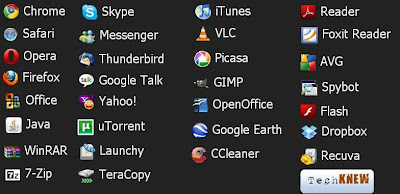
Now you can download all the programs (more at the site), by just choosing (PICK) the softwares that you want and Ninite will download (START) and install everything for you (LEAVE IT). Even if you just installed part of the programs that you have chosen and you restart your computer, you can always continue downloading and install by starting Ninite.
2. START
3. LEAVE IT
Imagine downloading all the programs below with just a few clicks.

Now you can download all the programs (more at the site), by just choosing (PICK) the softwares that you want and Ninite will download (START) and install everything for you (LEAVE IT). Even if you just installed part of the programs that you have chosen and you restart your computer, you can always continue downloading and install by starting Ninite.
Jan 5, 2010
Life on LINE
Read the latest news organized in a timeline form at Google News Timeline.
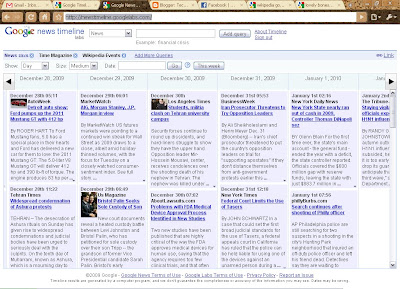
You can check the latest updates from any newspapers and blogs for your daily or entertainment needs!
Also, check out the Google Timeline, which was launched a few years ago during one of it's anniversaries. It shows you Google's major breakthroughs and highlights in the past decade by just scrolling with your mouse.


You can check the latest updates from any newspapers and blogs for your daily or entertainment needs!
Also, check out the Google Timeline, which was launched a few years ago during one of it's anniversaries. It shows you Google's major breakthroughs and highlights in the past decade by just scrolling with your mouse.

Nov 20, 2009
Have a glimpse of Google Chrome OS


Nov 19, 2009
Microsoft Office Professional 2010 beta
Microsoft Office Professional 2010 beta was launched yesterday. It is said to work faster and offers rich and powerful new ways to deliver your best work at the office, home, or school.
Details |
Publisher : Microsoft Operating systems: Windows Vista, Windows 7, Windows XP Service Pack 3 Release date : November 18, 2009 File size : 3 GB of available disk space |


