 Twitter
 Facebook
 Follow us on Google Reader
 Channel
 Home
Home Free
Free Feedburner
Google Cloud Connect for Microsoft Office is a plugin which allows you to sync your Microsoft Office documents to Google Docs. This allows you to backup your documents in real time and at the same time allows you to share, collaborate and sync the files automatically and conveniently. The settings can be easily tweak within the plugin and each document will have its own unique URL.
A picture speaks a thousand words, thus a video should speak far more than a picture, let's watch the video below.
Get Google Cloud Connect for Microsoft Office here.
Showing posts with label Document Edit. Show all posts
Showing posts with label Document Edit. Show all posts
Feb 25, 2011

Oct 15, 2010
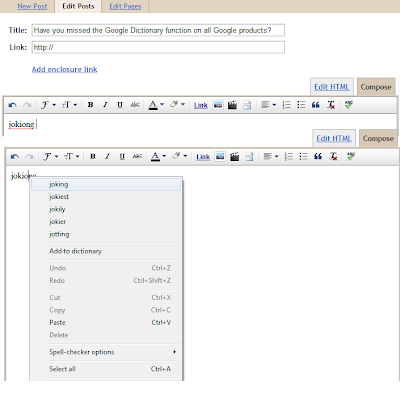
Have you missed the Google Dictionary function on all Google products?
As a reminder, Google's Gmail, Blogger and Docs have word spell checker and correction in its services.
Try it now if you have not known about it!
Follow techknew by clicking "Follow" on the sidebar or through @techknew on Twitter now!
Try it now if you have not known about it!

Follow techknew by clicking "Follow" on the sidebar or through @techknew on Twitter now!
Jul 5, 2010
Tips on Google Docs
I bet you've heard of Google Docs. This allows you to do your work wherever you are as the document can be accessed anywhere as long as you have internet connection and a Google account. Recently, Google Docs has been updated with several new features.


So what are you waiting for? Sign up now at Google Docs.
Google's new stable release of Chrome comes with built-in Adobe Flash (Joyce, you should try this.) so now, you don't have to manually download Adobae Flash on your own. With this,
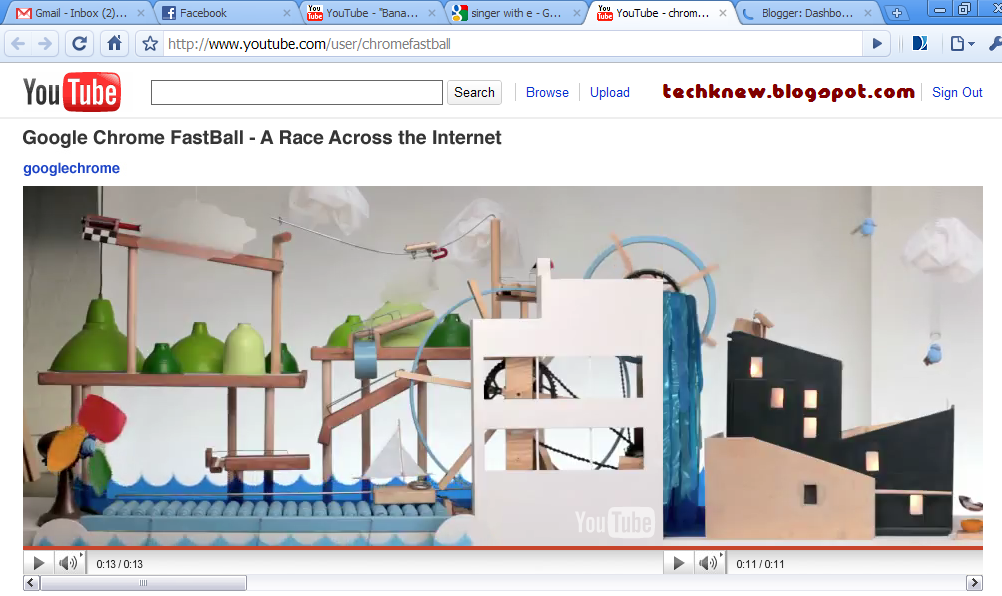
Google created a YouTube Video Game to highlight its new HTML5 feature. To complete the game, you have to answer several questions, which also boasts Google's dominance in internet search.

- Several users can edit and read the documents AT THE SAME TIME through Collaboration (by editting the Sharing settings in the picture below).
- Documents can be shared and published on blogs and websites (Publish to the Web).

- Google Docs support ODT (OpenOffice), CSV, RTF (RichText), PDF, DOCX(which will be converted to DOC for editing) and so on.

- In Google Docs' Spreadsheet (a Microsoft Excel look-alike), similar formulae can be used in Docs. This allows flexibility for Microsoft users.

- There is a ruler now for the margin. Indents can be added on the ruler by clicking on the ruler.

- Equation can be inserted easily.

- You can now draw in Google Docs

- There is a Word Count tool in Google Docs.

Titbits (You will like it):
Google created a YouTube Video Game to highlight its new HTML5 feature. To complete the game, you have to answer several questions, which also boasts Google's dominance in internet search.
Previously on TechKnew :
Jan 26, 2010
Convert Docx to Doc
Are you using Microsoft Office 2003 and someone sends you a .Docx file?
Now you can still access it for editing and reading by converting it to .Doc.
by downloading the DOCX CONVERTER widget on your desktop

or
by downloading the Microsoft Office Compatibility Pack for Word, Excel, and PowerPoint File Formats for Microsoft Office XP and 2003 users.
Jan 12, 2010
Convert PDF documents to WORD* format without hassle
* WORD documents such as Rich Text Format (.RTF), Microsoft Word, OpenOffice, and WordPerfect.

Convert PDF to Word files easily with NitroPDF's PDF to Word.
You can either convert your files online or download the 14-Day trial.

You can either convert your files online or download the 14-Day trial.
Details |
Publisher : Nitro PDF Operating systems: Windows Vista, Windows Me, Windows NT, Windows XP, Windows 2000, Windows 98 |
Jan 11, 2010
Convert files to PDF in 1step
Convert documents to PDF using PrimoPDF.
Now, you do not have to spend a penny to convert all your documents to PDF.
You can either drag and drop files onto Primo PDf 's desktop icon for quick conversion
or
1. Install PrimoPDF.
2. Open your word document or picture file.
3. Click the "Print" icon or "Print" at the "File" menu.
4. At "Select Printer", choose "PrimoPDF" as the printer. (Refer to the pictures below)
6. A PrimoPDF window will popped up. Choose the destination folder and edit the "Post Process" according to your needs. (Preferably "Open PDF")

Now, you do not have to spend a penny to convert all your documents to PDF.
You can either drag and drop files onto Primo PDf 's desktop icon for quick conversion
or
1. Install PrimoPDF.
2. Open your word document or picture file.
3. Click the "Print" icon or "Print" at the "File" menu.
4. At "Select Printer", choose "PrimoPDF" as the printer. (Refer to the pictures below)


5. Print.
6. A PrimoPDF window will popped up. Choose the destination folder and edit the "Post Process" according to your needs. (Preferably "Open PDF")

7. TADA! Your PDF file is created and you can find it at the destination folder.
Details |
Publisher : Nitro PDF Operating systems: Windows Vista, Windows Me, Windows NT, Windows XP, Windows 2000, Windows 98 Release date : October 08, 2009 File size : 7.39MB |
Jan 6, 2010
igNITE to start your engine
1. PICK
2. START
3. LEAVE IT
Imagine downloading all the programs below with just a few clicks.
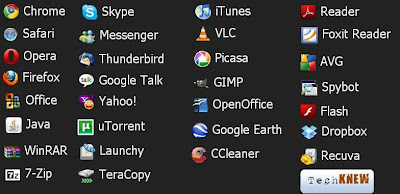
Now you can download all the programs (more at the site), by just choosing (PICK) the softwares that you want and Ninite will download (START) and install everything for you (LEAVE IT). Even if you just installed part of the programs that you have chosen and you restart your computer, you can always continue downloading and install by starting Ninite.
2. START
3. LEAVE IT
Imagine downloading all the programs below with just a few clicks.

Now you can download all the programs (more at the site), by just choosing (PICK) the softwares that you want and Ninite will download (START) and install everything for you (LEAVE IT). Even if you just installed part of the programs that you have chosen and you restart your computer, you can always continue downloading and install by starting Ninite.
Nov 19, 2009
PDF Reader
 Foxit Reader is the cure to Adobe's PDF Reader. It loads faster and works well with Windows operating systems. It's function are all the same as that of Adobe's. Try it now.
Details |
Publisher : Foxit Software Operating systems: Windows Vista, Windows XP, Windows 2000 Release date : November 5, 2009 File size : 5.07MB |
Microsoft Office Professional 2010 beta
Microsoft Office Professional 2010 beta was launched yesterday. It is said to work faster and offers rich and powerful new ways to deliver your best work at the office, home, or school.
Details |
Publisher : Microsoft Operating systems: Windows Vista, Windows 7, Windows XP Service Pack 3 Release date : November 18, 2009 File size : 3 GB of available disk space |
Oct 16, 2009
PDF Editor & Save Documents in PDF
Cannot edit your PDF files?
Try PDFill PDF Editor 7.0 which is free (but end product will have PDF Fill watermarks on every page) or the FREE PDFill PDF and Image Writer Free 7.0. The latter (PDFill PDF and Image Writer Free 7.0) is installed as a virtual printer driver and allows you to convert any printable document from any application which supports printing into a standard PNG, JPG, BMP, TIF, or GIF image.
I've tried it and it works well but there's the PDFill watermark in the background so your document may not look nice though. Download PDFill PDF and Image Writer Free 7.0 here.
The following is another PDF editor from Nitro PDF Software.


The following review was by CNET:
Reviewed by: Seth Rosenblatt on October 08, 2009

PrimoPDF converts just about any file type to a PDF, using the print command from the source program the file was created in. In the latest version, the program comes with desktop icon that you can drag and drop files onto for quick conversion, as well as performance improvements and minor changes throughout the program.
Users can now always save PDFs to the same folder, or opt to choose a new folder for each PDF creation. You can also Append or Overwrite an already existing PDF, and more easily create and edit document properties and PDF security from the main PrimoPDF interface. Publisher NitroPDF also claims that the program starts faster, and we did notice that it launched quicker than before--note that this was an empirical judgment, though. Primo's size has been reduced slightly to 7.38MB, and the new drag-and-drop icon also serves as a program launch icon, making it easier to manage the app.

The four conversion quality settings have been exposed upfront, too, so you can easily toggle quality settings from Screen to eBook to Print to Prepress. There's a Custom setting, as well.
The conversion process from whatever document is on your screen to PDF is quick and efficient. Other features include a password-protection feature that can be used for restricting reading, editing, or printing the PDF. However, trying to create a PDF while the interface was already open resulted in neither a new PDF nor a warning that there had been a failure. The interface also sports an ad for other PDF-related software made by Nitro that takes up half the interface. Those hitches aside, PrimoPDF is an effective tool for quick and casual PDF creation.
Sounds fun? Download it from CNET. Click here.


